
Account
PK365 Login and Registration Guide
Creating an account on PK365 Game takes only a few simple steps on your phone. The official app or website shows a clear Register tab right at the top. New players can use their mobile number, email or profile to start. A quick SMS code confirms ownership and keeps the process secure. Once finished, the account opens and daily gifts become available at once.
Logging back into PK365 Game feels just as easy after registration. The Login tab sits next to Register on the same screen. Users enter their number or email plus the password they created. An optional Remember password box saves time for future visits. Quick login icons for Google, Telegram or face unlock also appear for faster access.
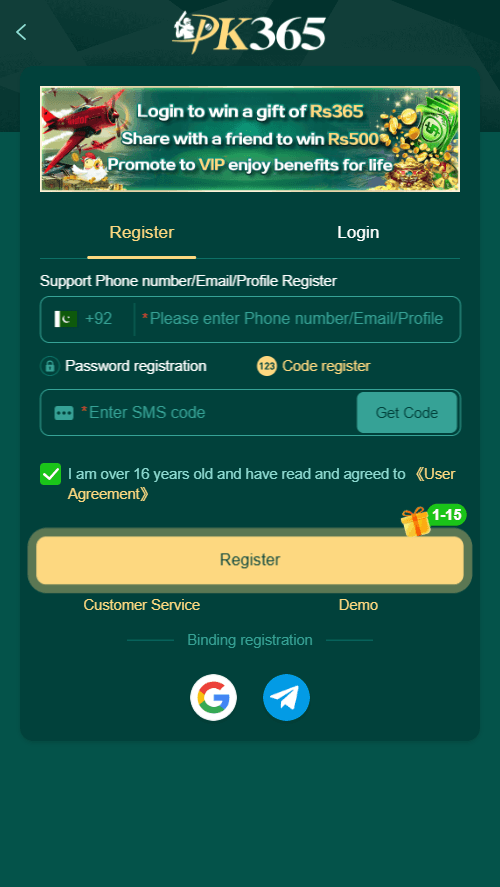
How to Register Your PK365 Game Account?
- 1
Open the official PK365 app or website and tap the Register tab.
- 2
Enter your Pakistani mobile number with the +92 code already shown.
- 3
Choose Password registration or Code register according to your preference.
- 4
Tap Get Code, then type the SMS code you receive on your phone.
- 5
Tick the box confirming you are over 16 and agree to the User Agreement.
- 6
Press the Register button to finish and open your new account.
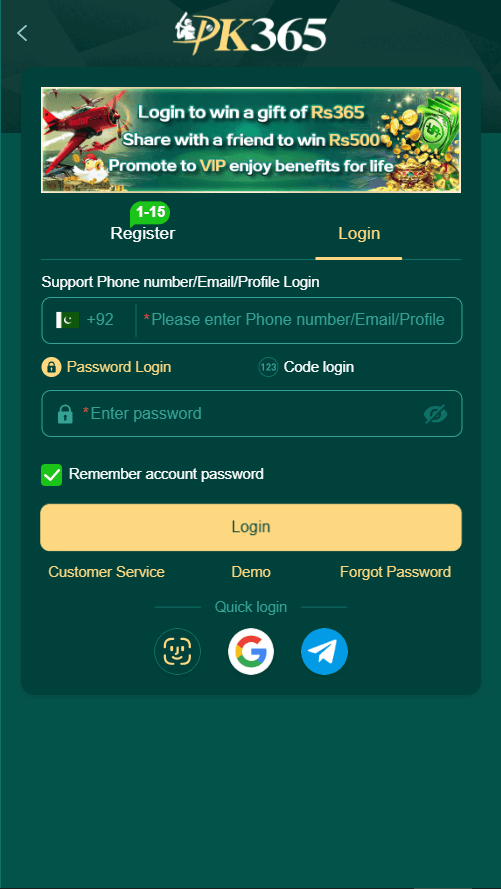
PK365 Login Process?
- 1
Open the official PK365 app or website and select the Login tab.
- 2
Type your registered phone number, email or profile in the main field.
- 3
Enter your password or switch to Code login if you prefer that method.
- 4
Tick Remember account password if you want faster access next time.
- 5
Press the Login button or use the quick login icons below.
Troubleshooting Common Problems While Registration and Login
- Problem
SMS code not arriving
What to doCheck network signal, wait 60 seconds, then tap Get Code again
- Problem
Wrong password error
What to doUse Forgot Password option and reset with a new SMS code
- Problem
Number already registered
What to doSwitch to Login tab or try a different mobile number
- Problem
App not opening after install
What to doRestart phone and allow install from unknown sources again
- Problem
Login button stays inactive
What to doFill every required field and tick the age agreement box